SYMPHOBIA 2 is more of what you've been missing in your orchestral palette. New and exciting ORCHESTRAL ARTICULATIONS, massive amounts of fresh and inspiring SYMPHONIC EFFECTS, exclusive LEGATO ENSEMBLES with real legato transitions, DYSTOPIA III and a brand-new interface. SYMPHOBIA 2 is the new no-brainer addition to the SYMPHOBIA series for any film, game or TV composer.
Cinesamples - Cinebrass
CineBrass is revolutionary in its power and simplicity for recreating the sound of the orchestral brass section. The library was designed by composers, for composers, with direct feedback from the film music community during its development. The result is a brass library that is easy to use, composer-friendly, with unparalleled recording quality.
Orchestral Tools - Orchestral String Runs
The industry´s first RUNS BUILDER
for Violins and Cellos+Basses. (Create your individual runs out of thousands of tempo-synced runs-fragments!)
Orchestral Tools - Orchestral String Runs V2
We are very happy to release OSR 2 today. We needed some "extra" time for additional recording-sessions with the orchestra to bring some of our visions into OSR 2. The update will not include additional basic-runs, because OSR has a huge amount of pre-recorded runs.
Tonehammer - Bowed Piano [Kontakt]
Welcome to Bowed Grand Piano – a library decided to deep sampling of bowed and FX based grand piano strings.
Toontrack - Music City USA SD | HYBRID | AiRISO | 9.60 GB
Like it, love it or leave it, Nashville Tennessee is Music City USA. With more labels, publishers, writers, producers, musicians and artists per capita than any other city in North America, Nashville knows a thing or two about great music, and more importantly - great sounding music.
With the city’s history & culture so steeped in the art of making and recording music, the team could think of no better place on earth to record a library of drums that would be at home in music ranging from rock to reggae, metal to gospel or punk to polka. Oh yeah... they’re good for country & rock too!
Introducing the Music City USA SDX™ , the newest library of drum samples and MIDI grooves for our award winning, industry standard drum production platform, Superior Drummer® 2.0.
Much like its sibling, the Nashville EZX®, the Music City USA SDX™ found us working with Harry Stinson and Chuck Ainlay, two of the best, most experienced players and producers in the business.
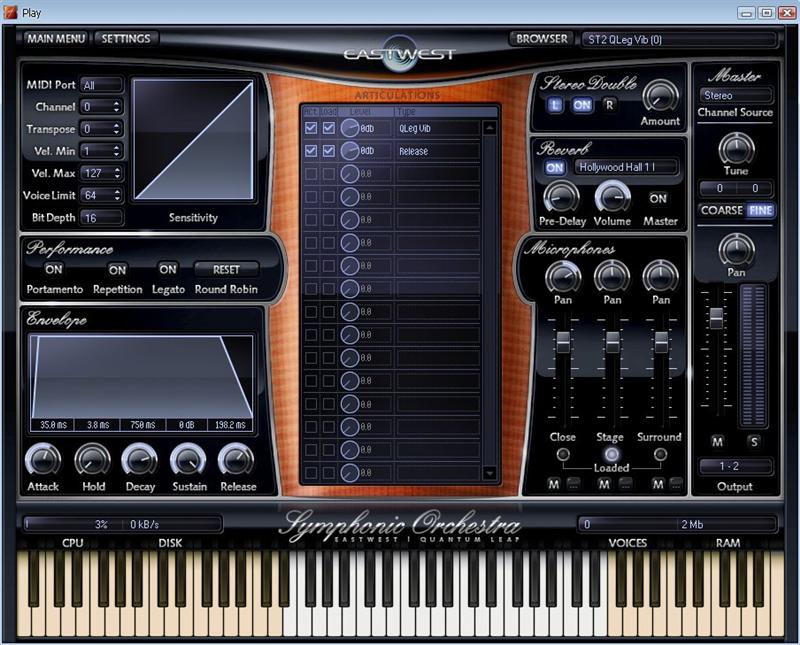
EWQL Symphonic Orchestra Free Play Edition | 1.83 GB
EastWest has announced that, in exchange for completing a short survey and signing up for the SoundsOnline newsletter, they are giving away a free "starter version" of the EWQL Symphonic Orchestra virtual instrument.
EWQL Symphonic Orchestra Free Play Edition is not time limited, and not copy protected. It's available in stand-alone and VST, AU and RTAS plug-in formats for Windows
EastWest says it is doing this because they have the utmost faith that once you get to experience this starter version you will want to upgrade to the Gold, Platinum, or Platinum Plus versions with their extensive articulations and other enhanced features (but they don't mind if you stick with the freebie).
Included Instruments:
* Violin Lyric
* Violin Sustenuto
* Trumpet Legato
* Trumpet Staccato
* French Horn Staccato Long
* Basson Sustenuto Vibratto
* Double Bass Quick Up Down
* Crotales
* English Horn Partato
* Marimba
* Orchestral Chimes
* French Horn Legato
* Concert Flute Legato
* Sleigh Bells
* Trombone Legato
* Trombone Legato Vibrato
* Tambourine
* Triangle
* Viola Pizzicato
* Cello Sustenuto Vibrato
Install Instructions:
Run EWQL Orchestra Free Installer Part 1 32 bit.msi, then reboot, Run EWQLSO Free Installer Part 2.msi and then run EWQLSO Free Installer Part 3.msi
Weighing in at over 18 Gigabytes, Synergy is a collection of 1200+ instruments, tempo-synced loops, and multis that aims to deliver the next generation of diverse sounds in an intuitive user interface.
Powered by Native Instruments Kontakt Player engine, Synergy utilizes extended sample synthesis and effectual techniques to provide you interactive, ready-to-play instruments. With Synergy's flexible sound sculpting interface, control is in your hands. All instruments can be modified, redesigned, and customized to your preference. This makes Synergy perfect for any performance and production environment.
Powered by Native Instruments Kontakt Player engine, Synergy utilizes extended sample synthesis and effectual techniques to provide you interactive, ready-to-play instruments. With Synergy's flexible sound sculpting interface, control is in your hands. All instruments can be modified, redesigned, and customized to your preference. This makes Synergy perfect for any performance and production environment.
Instrument categories include:
* Ambience (295 patches)
* Bass (54 patches)
* Drums (55 patches)
* Impacts (269 patches)
* Melody (173 patches)
* Pads (57 patches)
* Rhythms (270 patches)
* Multis (40 patches)
Installation:
1. create a useful folder to contain library e.g. :
\My Sample Libraries\Sample Logic\Synergy
2. copy the contents of D1 to the folder :
\Documentation
\Instruments
\Multis
\Samples
Synergy_info.nkc
Synergy_info.nkx
3. copy the contents of D2 and D3 into the \Samples folder
AcousticSamples - Old Black Grand Piano Pleyel | Kontakt | 6.96 GB
Everybody keeps on sampling the best and cleanest piano ever! here is a completely different approach. We sampled an old Pleyel Grand Piano (F-71240 model from 1928) with vintage gear like a studer console and tube microphones, it has the rich and warm sound of the old jazz/blues or even classical music recordings.
General panel:
Here you can change most of the basic parameters of the library, the volume of the releases, the noise the keys produce, the amount of sympathetic resonance, the volume of the pedal noises, you can also change the tone and enable the "true pedal action" (a feature that we introduced that allows the pedal down resonance to fade in when you press the pedal even if the note was started with the pedal up).
Microphone mixing:
We recorded the OldBlackGrand with two pairs of microphones. One was placed inside the piano, close to the strings and the other one outside of it about where a soloist would be placed. You can change the volume and pan of each microphone position as well as play them all together to get the sound that you really want.
Midi panel:
You have two way to adjust this library to your playing style / keyboard.
- The Map is a velocity remapper. You can tweak the imput/output velocity mapping. You can find some presets in the velocity curve menu.
- The sensitivity decides how the volume is changed with velocity.
You can also choose a "min velocity" under which no sustain sound will be played. You will still hear the key noises as on a real piano.
Features:
12,89Gb sample bank, no loops Recorded at 24/88,2Khz downsampled to 24/44.1khz,
9 velocity layers for the sustain,
9 velocity layers for the release,
Extensive use of the filters of Kontakt4, the transitions between layers are non noticeable leading to a continuous evolution of the sound,
Two microphone positions: close (inside) and rim (singer position) that you can enable/diable and mix,
Adjustable sympathetic resonance,
Thumps samples and Automatic Pedal noises samples,
True pedal action technology,
Midi panel to let you finely control the response of the instrument (velocity remapper, sensivity),
Advanced scripting capabilities for a real mechanical behaviour simulation and polyphony saving.
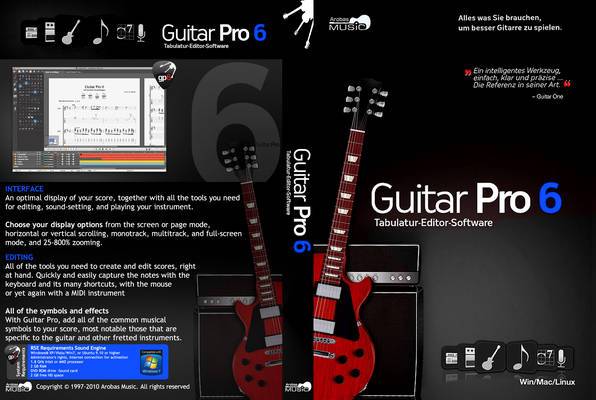
Guitar Pro 6.0.9 r9934 | Final & Soundbanks | 1.87 GB
Guitar Pro 6 - the best editor tablature with realistic sound and the ability to create your own complete tracks. It is also a tutor and an advanced music books. Manufacturer Arobas Music actually sets the standard, convenient not only guitarists but all musicians. And, accordingly, bypassed all the convenience of working with this format.
Capabilities
• Recording of music for guitar, bass guitar, banjo, and also for many other instruments and ensembles in the form of tablature or sheet music charts (with a corresponding set of tabs tablature line with musical notation and vice versa);
• Creating a party for winds, strings, musical instruments;
the creation of parties to the drum set and percussion;
• Add lyrics and link it to the notes of the tracks with vocals;
• Built-builder and the determinant of the guitar chords;
• Exports generated scores in MIDI, ASCII, MusicXML, WAV, PNG, PDF, GP5 (in Guitar Pro 6), printing;
• Import of MIDI, ASCII, MusicXML, Power Tab (. Ptb), TablEdit (. Tef)
• A virtual guitar fretboard, keyboard, piano and percussion instruments panel, which displays the notes are played at the moment. With their help, you can also create and edit • Party of the instrument;
• Built-in metronome, guitar tuner, transpose tool paths;
• A large number of tools for display in the notes specific to the guitar playing techniques and choice of options for scoring;
• Starting with version 5, the program appeared Technology RSE (Realistic Sound Engine), allowing to bring the guitar to the real, and applying various effects (guitar "gadgets", the effect of «wah-wah», etc.) in real time.
• Supports legacy programs - gtp, gp3, gp4, and gp5 (for versions 5.x and 6.0).
New in Guitar Pro version 6
• Ability to run on platforms Windows, Linux, Mac OS (thanks to the fact that Guitar Pro 6 is completely rewritten to use Qt)
• Significantly revised user interface in the direction of improving usability: a system of tabs open documents in a box;
sidebar, containing tabs with different tools for editing music format, select the tool and system, the effects (imitation of guitar pedals, amplifiers, equalizers, compressors), etc.
• High-quality voice scores. The sound in the RSE Guitar Pro 6 is very close to the real sound of instruments.
• Ability to record the rhythm guitar "slash";
• Ability to record a full chetyrehgolosiya;
• Support for recording wind, string and keyboard instruments;
• Greatly improved musical schedule, you can manually change the width of the stroke by moving the bar line, as a whole is closer to the academic tradition of musical notation
• The broken clock feature
• Signs of repeat cycles (alternative reprise)
• There was a double point (increase in length by 1.75 times)
• You can create n-plets (where a limited number of notes is divided by another number of notes of longer duration equated to them (eg 3:2))
• There was a pause (delay)
• Double-flat and double-sharp, and Bekar
• Stakkatissimo
• Improved menu flageolets
• tapping your hands, indicating
• Arpeggios
• Rasgeado
• Gruppeto
• Crescendo, dekreschendo
• Improved menu chords (now shows chords depending on the instrument (the piano does not show the guitar fingerings))
• Ability to identify barre
• Timer - feature that shows the time at which the note will be played
• Bookmarks (section) - the separation of the score into sections, you can assign each letter of the name and
• You can adjust tempo, volume and balance (as one does, and all lanes), which allows for some serious and
What is Saundbanki (Soundbanks)
- Saundbanki (Soundbanks) - it's not ready tabs of millions of artists. This is a set of samples so that sounded not MIDI-note, and relatively realistic.
- Saundbanki put yourself if you are close to the established program. If for any reason, they are not established, you can simply throw the file in the window or open a file from the menu.
- If saundbanki not needed, ie enough MIDI, do not forget to turn off the RSE, pressing F2.
Guitar Pro is first and foremost a software designed to edit tablatures for guitar, bass, and other fretted instruments from 4 to 8 strings. With Guitar Pro you'll be able to learn how to play, compose and improve your guitar skills.
Its great ease of use and the success of its specific file format have made it a software used by guitarists worldwide. It now includes editing support for many other instruments like the piano or the drums, a realistic audio engine, and interactive tools to support every musician's practice.
Here are some key features of "Guitar Pro":
Custom Views:
· With Guitar Pro you have the option of working either directly in page or screen mode (horizontal or vertical). The screen modes use all the space available in the workspace. It is possible to change at any moment the proportions and page setup of your document as well as the viewed tracks.
Automatic page setup:
· Guitar Pro automatically configures the vertical position of the various elements of the score. The input is therefore very rapid, giving an output similar to that of published songbooks.
Synchronization:
· Guitar Pro automatically adds the bars and provides synchronization between the tracks of the score. This strict synchronization is needed for proper sound rendering of the score and it can also be educational at the same time.
Interactive tools:
· Each tool within Guitar Pro is closely linked to the active track properties. For example, if you opened the guitar tuner, it would give you the tuning chosen for that specific track. This makes Guitar Pro very powerful, and easy to use.
Guitar Pro 6.0.9 - Latest Release (r9934 2011-06-30)
* [Added] New user interface for soundbank selection, by way of an integrated browser.
* [Added] Integrations of RSE soundbank changes and / or pickup changes into the track.
* [Added] New lossless compression algorithm for the incoming soundbanks.
* [Added] MacOS-10.7 Lion support.
* [Fixed] Stability issue on Windows Vista.
* [Fixed] Symbols and fingering for pick upstrokes and downstrokes can be placed on tied notes.
* [Fixed] In Jazz, C time signature was invisble.
* [Fixed] Undo (Ctrl + Z) did not restore second voice.
* [Fixed] A crash was possible when using multi-voice editing.
* [Fixed] Snare did not consider brush playing style



 5:59
5:59
 Samplerion






 Entradas


